
Showing posts with label simulink. Show all posts
Showing posts with label simulink. Show all posts
Friday, December 11, 2015

Thursday, December 10, 2015


Wednesday, December 9, 2015


Tuesday, December 8, 2015

Sunday, December 6, 2015


Saturday, December 5, 2015
Execution Of Stateflow Chart
By default, Stateflow charts execute once for each active input event. If no input events exist, the charts execute once every time step. That means were you to use a solver with variable step, the charts may get executed at time step not evenly distributed.
Consider the following simulink model,
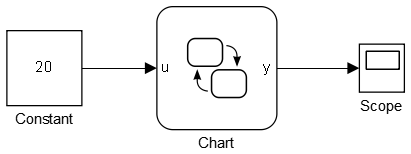
the chart is very simple as shown below.
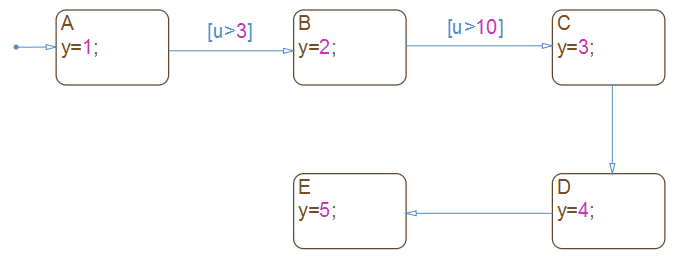
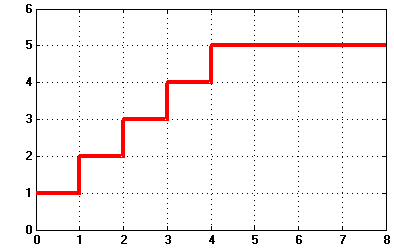
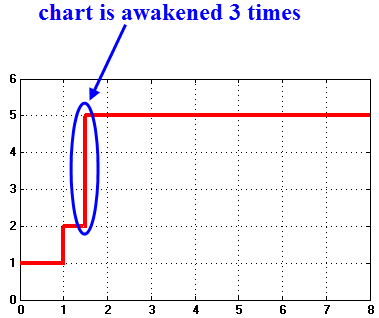
Now, if you run the simulation with a solver w/ variable-step and set the Max step size to be 1, your chart will be awakened at 0s, 1s, 2s, 3s, 4s, 5s, as is evidence by the chart output y.
Suppose, you would like to add a source, a step, say, somewhere in the simulink model, and set the step time @1.5s,
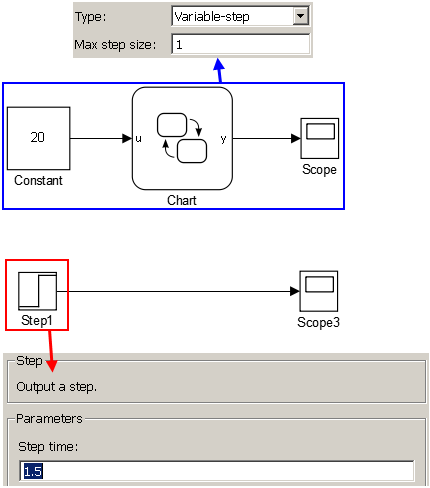
Since 1.5 is not a integer, solver that with variable simulation step will add additional point in its simulation time list (shown below):
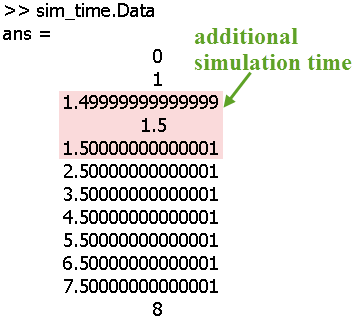
As can be seen, when the step block is added into the Simulink model, the solver will simulate at 3 more instants (1.4999,1.5,1.50001), so the stateflow chart will have a totally different response in that case.
Consider the following simulink model,
the chart is very simple as shown below.
Now, if you run the simulation with a solver w/ variable-step and set the Max step size to be 1, your chart will be awakened at 0s, 1s, 2s, 3s, 4s, 5s, as is evidence by the chart output y.
Suppose, you would like to add a source, a step, say, somewhere in the simulink model, and set the step time @1.5s,
Since 1.5 is not a integer, solver that with variable simulation step will add additional point in its simulation time list (shown below):
As can be seen, when the step block is added into the Simulink model, the solver will simulate at 3 more instants (1.4999,1.5,1.50001), so the stateflow chart will have a totally different response in that case.


Simulink Variable Step Simulation
For Simulink variable step simulation, the Max step size option is by default set by:

so, e.g. if start time is 0 and stop time is 10, then, the default (auto) Max step size is 0.2s
so, e.g. if start time is 0 and stop time is 10, then, the default (auto) Max step size is 0.2s
Thursday, December 3, 2015

Friday, November 27, 2015


Wednesday, November 25, 2015
Using Multiple Events in A Chart

Saturday, November 14, 2015


Subscribe to:
Posts (Atom)